

Test release 0.1.0-rc.16
6529 Validator
It runs on your computer, computes each day's TDH from Ethereum and signs it.
0.1.0-rc.16 is an urgent update
This release starts the 6529 chain, with the test currency $fake6529. The chain starts at 12:00 UTC on 13 November. Update before then to earn $fake6529 from its first day.
If you run a release before 0.1.0-rc.9, update by 2026-11-08 00:00 UTC. From Sunday 8 November, 00:00 UTC, signed TDH counts only on the new chain, which 0.1.0-rc.9 runs.
0.1.0-rc.16 · macOS 11 or newer · Apple silicon or Intel · 107.3 MB
0.1.0-rc.16 · Windows 10 or 11 · 64-bit · 42.1 MB



Three steps
Step 1: Open it
Drag 6529 Validator to Applications, then open it from Applications, never from the disk image. When macOS asks if you're sure, press Open.
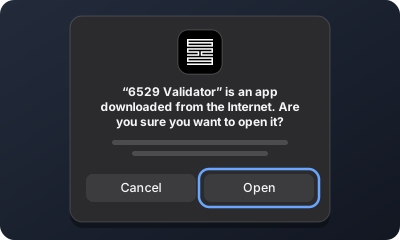
What you'll see (a drawing) Step 2: Follow the app
It makes this computer's key and asks your wallet to sign once. That sends no transaction and costs nothing. If your wallet is in another browser, press Copy sign-in link and open the link there. If it's on your phone, choose Your phone (Use your phone in the app's window), paste the wallet's address and scan the code.
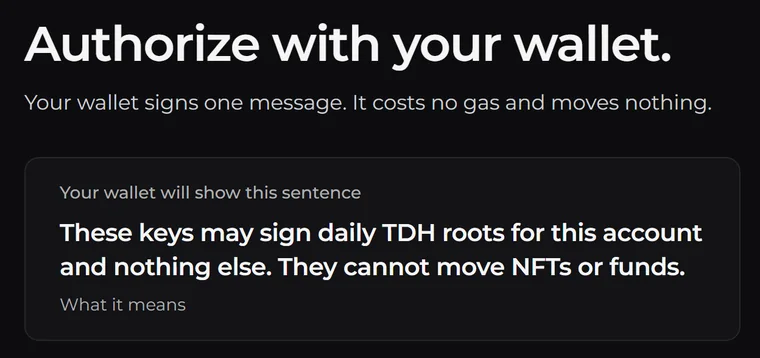
From the app Step 3: Leave it running
It signs once a day by itself.
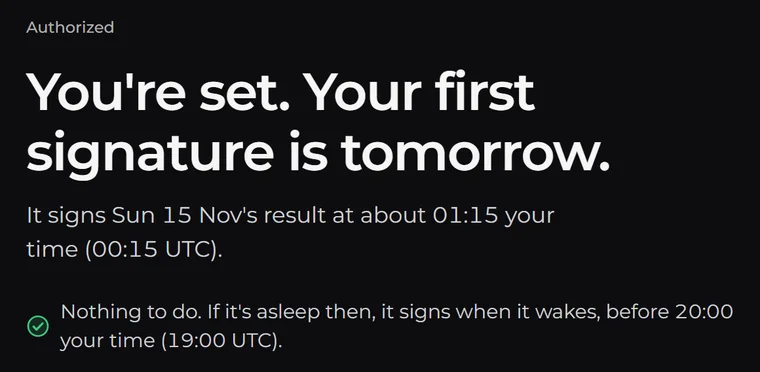
From the app
What else you'll see on a Mac
- macOS says Background Items Added. That is the validator, which runs whenever you are logged in.
- While the validator service starts, the app shows each step and what it is doing now. If one takes too long, the app says which, with Restart the validator service and Show the log.
- If macOS says it could not verify the app, or that Apple can't check it, press Move to Trash and tell us. Don't press Open Anyway in System Settings.
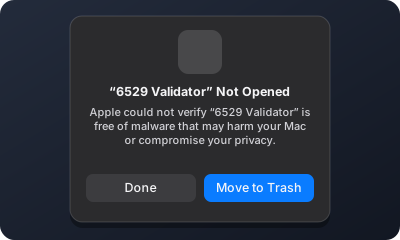
What you need
- A 64-bit computer: a Mac with macOS 11 or newer, a Windows 10 or 11 PC, or a Linux computer, a Raspberry Pi 4 or 5 among them.
- One that stays on, at home or in your office. A cloud server works too.
Send feedback
Post your results in the Ministry of Validation wave, using this template:
Computer and system:
File installed:
Home or data center:
Tor, on or off:
What happened:
Times, in UTC:
In the app, Report a problem (in 6529's logo menu) makes a cleaned report with a box for your words, for you to paste there. It leaves out your account, addresses and names. Don't post raw logs or status files: they show your keys and your account.
6529 never starts a DM with you or asks for a seed phrase.
Linux and the terminal
Linux needs glibc 2.35 or newer: Ubuntu 22.04, Debian 12, Linux Mint 21, Raspberry Pi OS Bookworm (64-bit) or newer. In the folder with the file, run this on x86-64:
sudo apt install ./6529-validator_0.1.0_amd64.deb
Or this on ARM64:
sudo apt install ./6529-validator_0.1.0_arm64.deb
It installs a service that starts with the computer. Then open 6529 Validator from your apps, or run validator open, and follow the page. On a computer with no screen, follow the steps the install prints.
The AppImage is for other Linux desktops on x86-64. Make it executable with chmod +x 6529-Validator-0.1.0-x86_64.AppImage, then open it. It signs only while it is open.
Each terminal archive holds the program and its install guide, in docs/install/. On a cloud server, keep the defaults, with Tor on.
All files and checksums
Build 0.1.0-rc.16, published 2026-11-13, commit 7a9a4c8. Earlier builds are under Releases.
| File | Size | SHA-256 | Publisher | Download |
|---|---|---|---|---|
| Mac, Apple silicon or IntelApp (.dmg)6529-Validator-0.1.0.dmg | Size107.3 MB | SHA-25611ef8385b77a… | Publisher6529 Collection LLCnotarized by Apple | Download |
| Windows, x86-64Installer (Setup.exe)6529-Validator-Setup-0.1.0-x64.exe | Size42.1 MB | SHA-2566766c7e92e8f… | Publisher6529 Collection LLC | Download |
| Linux, x86-64.deb package6529-validator_0.1.0_amd64.deb | Size34.7 MB | SHA-256e0f574c8dff1… | PublisherNone | Download |
| Linux, ARM64.deb package6529-validator_0.1.0_arm64.deb | Size31.9 MB | SHA-2569778a2d3687d… | PublisherNone | Download |
| Linux, x86-64AppImage6529-Validator-0.1.0-x86_64.AppImage | Size50.5 MB | SHA-256faabfd291985… | PublisherNone | Download |
| Windows, x86-64Installer (.msi), the one inside Setup.exe6529-Validator-0.1.0-x64.msi | Size41.5 MB | SHA-256535d8d958a49… | Publisher6529 Collection LLC | Download |
| Mac, Apple siliconTerminal archivevalidator-0.1.0-aarch64-apple-darwin.tar.gz | Size51.1 MB | SHA-25696215908d1e2… | Publisher6529 Collection LLCnotarized by Apple | Download |
| Mac, IntelTerminal archivevalidator-0.1.0-x86_64-apple-darwin.tar.gz | Size55.1 MB | SHA-256dee127854a2c… | Publisher6529 Collection LLCnotarized by Apple | Download |
| Windows, x86-64Terminal archivevalidator-0.1.0-x86_64-pc-windows-msvc.zip | Size50.3 MB | SHA-256a5ef961450bb… | Publisher6529 Collection LLC | Download |
| Linux, x86-64Terminal archivevalidator-0.1.0-x86_64-unknown-linux-gnu.tar.gz | Size54.3 MB | SHA-256038f6eab25b4… | PublisherNone | Download |
| Linux, ARM64Terminal archivevalidator-0.1.0-aarch64-unknown-linux-gnu.tar.gz | Size53.1 MB | SHA-256ca6fd723367b… | PublisherNone | Download |
| AnySource of lyrebird, Tor's bridge program in the validator (GPL 3.0 or later)lyrebird-0.9.0-source.tar.gz | Size66.6 MB | SHA-2564dd0d054eb95… | PublisherNone | Download |
| Anyrelease.json: its commit and each program's SHA-256release.json | Size6 kB | SHA-256708bd3f68950… | PublisherNone | Download |
Each SHA-256 comes from 6529's signed list of releases. This page checks that signature before it lists a file. The publisher is the name your system should show when it opens the file or, for an archive, the program inside it; this page doesn't check it, so check it yourself.
Check a file
In the folder with the file, run the command for your system and compare what it prints with the SHA-256 above. Windows prints capital letters; the letters and digits must match. If they differ, delete the file.
- Mac, in Terminal
shasum -a 256 6529-Validator-0.1.0.dmg - Windows, in PowerShell
Get-FileHash .\6529-Validator-Setup-0.1.0-x64.exe - Linux
sha256sum 6529-validator_0.1.0_amd64.deb
It lists the SHA-256 of every file. On Linux, in a folder with it and your downloads, run sha256sum --check --ignore-missing SHA256SUMS to check them all. 6529 also signs the list of releases, and your validator checks that signature before it tells you about a new one.
Known issues
The known issues list each one with its workaround. A new install must start before about 2026-11-23 03:30 UTC, and 0.1.0 stops signing on 1 December.