

Test release0.1.0-rc.2
Use 6529 AI
6529 AI runs open-weights AI models on your computer. Once it is installed, this page takes you through real use, one step at a time, with a picture of each step.
Untested test release. Expect problems, and don't rely on it for anything that matters. Known issues
You chat with the models, make images and turn speech into text in a page in your browser, and your own programs reach the same models through an OpenAI-compatible API on 127.0.0.1. Not installed yet? The Guide installs it on a Mac, Windows or Linux.
Your port, sizes and timings will differ from the ones here. Where a step shows a port, ours was 43188; use the one your install prints.
1Sign in to the page
The page answers on 127.0.0.1 only, and signs a browser in with a one-time link. On a Mac, opening 6529 AI from Applications makes a new link and opens it. On Windows, the Start menu's 6529 AI does the same. On Linux:
sudo -u ai6529 6529-ai-cli --data /var/lib/6529-ai open --printOutput: http://127.0.0.1:43188/login?token=<hidden>
The page is at http://127.0.0.1:43188. This one-time link works once, within 24 hours.
Open it in the browser you use, on this computer.The top bar then says Signed in. With no model yet, Chat says No model to chat with yet. Press Get started.
Signed in opens this browser's sign-in, an app key for the page, and the theme: Light, Dark, or Same as this device.
2Choose a model on Start
Start says how big a model this computer can run, and lists up to five general chat models that fit, biggest first.
What to expect: A computer with a 24 GB graphics card gets models up to about 20 GB; a Mac with 24 GB of memory, up to about 16 GB.
The pictures here follow gemma-4-26b-a4b, a 15.6 GB model that reads images.
3Fetch and serve
Press Fetch and serve. The service downloads the model's files from the registry, checks each file's size and SHA-256 against the model's manifest, then starts its engine. The headline says how much has come.
When the engine is up, the headline says the model is ready, and Open chat takes you to it. The service serves it again at every start.
What to expect: A 16 GB model takes a few minutes to download and about a minute to load from a fast disk. A model about as big as the computer's memory can load much more slowly: see Known issues.
If the download fails, the row says Download failed with the reason. Try again serves it anew, and Stop serving drops it.
4Chat
Pick the model at the top, type, and press Send. The answer streams in. A model that thinks first shows its reasoning under Thinking, folded. Below each answer are the model, its speed and Copy.
The chat keeps its history, so a follow-up works.
Chats are kept in this browser only. New chat starts another, and System prompt sets one for this chat.
What to expect: On a 24 GB graphics card this model writes a few paragraphs in a few seconds; on an M2 Mac it takes about three times as long.
5Ask about a picture
A model marked reads images takes pictures in chat. Attach one with the clip, by pasting, or by dropping it on the chat, then ask about it.
The picture is the Earthrise photograph from Apollo 8, by NASA. The page scales large photos down before it sends them.
6Make an image
Image needs an image model, such as z-image-turbo (20.7 GB), which you serve from Models on the Provider screen (section 8).
Pick the model, describe the image, pick a size and press Make the image.
Download saves it, and Send to chat attaches it to a chat. Images stay until you leave the page.
What to expect: The first image waits while the model loads, about a minute in all; each one after it takes about 15 seconds.
7Turn speech into text
Speech needs a speech model, such as whisper-large-v3-turbo (0.6 GB). Record records from your microphone, and Choose a file takes an audio or video file. Then press Transcribe.
Copy the text copies it, and Send to chat puts it in a chat. Speech to text needs ffmpeg. apt installs it with the .deb; on a Mac or Windows you install it yourself.
8See what runs: the Provider screen
Provider shows what runs on this computer. Engines lists each served model and its state, and This computer lists what the service read about the machine.
Models lists every model in the registry. The menu shows the models this install runs, every model, or the ones that make text, images or embeddings. Each row has Fetch, which downloads the files only, and Serve here, which downloads them and starts the engine. A model too big for the estimate, or one this install can't run, says so.
9Make an app key
Your own programs use the models through the API with an app key. On Keys, give the key a name, list the models it may use (empty for every model), the days it lasts (1 to 90), and the web origins that may use it. Press Make the key.
The page shows the new key once; the service keeps only its SHA-256. Copy it then.
Revoke ends a key at once. The page asks first, in a browser dialog: "Revoke the key "Scripts on this computer"? Apps that use it lose access at once, and a revoked key can't be used again." A request with a revoked key gets HTTP 401.
10Use the API
The API is at http://127.0.0.1:<port>/v1 and takes OpenAI's requests. Put your key in the environment:
export OPENAI_API_KEY='6529ai_...'With curl
The models this server has:
curl -s http://127.0.0.1:43188/v1/models -H "Authorization: Bearer $OPENAI_API_KEY" | jqShow output (16 lines)Hide output
Output: {
  "data": [
    {
      "capabilities": [
        "vision"
      ],
      "created": 1794870225,
      "id": "gemma-4-26b-a4b",
      "modality": "chat",
      "object": "model",
      "owned_by": "local",
      "state": "ready"
    }
  ],
  "object": "list"
}
A chat request:
curl -s http://127.0.0.1:43188/v1/chat/completions \
  -H "Authorization: Bearer $OPENAI_API_KEY" -H "Content-Type: application/json" \
  -d '{"model": "gemma-4-26b-a4b", "messages": [{"role": "user", "content": "What is the capital of Portugal? One word."}]}' \
| jq '{answer: .choices[0].message.content, usage}'Show output (11 lines)Hide output
Output: {
  "answer": "Lisbon",
  "usage": {
    "completion_tokens": 60,
    "prompt_tokens": 26,
    "total_tokens": 86,
    "prompt_tokens_details": {
      "cached_tokens": 7
    }
  }
}
The full answer also has reasoning_content, the model's thinking, and timings. Without a key the API answers HTTP 401:
curl -s http://127.0.0.1:43188/v1/models | jqOutput: {
"error": {
"message": "send Authorization: Bearer <key>, or sign in: run 6529-ai-cli open, or open the link in run/login-url in the service's data folder",
"type": "invalid_request_error",
"code": "invalid_api_key"
}
}Speech to text takes OpenAI's form:
curl -s http://127.0.0.1:43188/v1/audio/transcriptions -H "Authorization: Bearer $OPENAI_API_KEY" \
-F model=whisper-large-v3-turbo -F file=@speech-sample.wav | jqOutput: {
"text": "And so, my fellow Americans, ask not what your country can do for you, ask what you can do for your country."
}An image comes back as base64:
curl -s http://127.0.0.1:43188/v1/images/generations \
  -H "Authorization: Bearer $OPENAI_API_KEY" -H "Content-Type: application/json" \
  -d '{"model": "z-image-turbo", "prompt": "A paper boat on a pond, photograph", "size": "1024x1024", "response_format": "b64_json"}' \
  | jq -r '.data[0].b64_json' | base64 -d > boat.png
file boat.pngOutput: boat.png: PNG image data, 1024 x 1024, 8-bit/color RGB, non-interlacedWith OpenAI's Python library
Install the library, then give it the base URL. It reads the key from OPENAI_API_KEY.
python3 -m venv ~/venv && ~/venv/bin/pip install -q openaihello.py:
from openai import OpenAI

client = OpenAI(base_url="http://127.0.0.1:43188/v1")

reply = client.chat.completions.create(
    model="gemma-4-26b-a4b",
    messages=[{"role": "user", "content": "Suggest three names for a bakery that sells bread made with old grains. One line each."}],
)
print(reply.choices[0].message.content)~/venv/bin/python hello.pyOutput: Heirloom Hearth
Ancestral Grain Co.
The Old Seed BakeryStreaming, in stream.py:
from openai import OpenAI

client = OpenAI(base_url="http://127.0.0.1:43188/v1")

stream = client.chat.completions.create(
    model="gemma-4-26b-a4b",
    messages=[{"role": "user", "content": "Write a haiku about a GPU."}],
    stream=True,
)
for chunk in stream:
    if chunk.choices and chunk.choices[0].delta.content:
        print(chunk.choices[0].delta.content, end="", flush=True)
print()Output: Silicon and math,
Painting worlds with light and code,
Frames dance on the screen.Speech and images, in media.py:
import base64

from openai import OpenAI

client = OpenAI(base_url="http://127.0.0.1:43188/v1")

with open("speech-sample.wav", "rb") as audio:
    text = client.audio.transcriptions.create(model="whisper-large-v3-turbo", file=audio)
print("Heard:", text.text)

image = client.images.generate(
    model="z-image-turbo",
    prompt="A bowl of ramen on a wooden table, photograph",
    size="1024x1024",
    response_format="b64_json",
)
with open("ramen.png", "wb") as f:
    f.write(base64.b64decode(image.data[0].b64_json))
print("Saved ramen.png")Output: Heard: And so, my fellow Americans, ask not what your country can do for you, ask what you can do for your country.
Saved ramen.png
With a coding tool
A tool that takes an OpenAI-compatible endpoint works the same way: give it the base URL, the key and the model's name. Here aider, a coding assistant for the terminal, works in a git repository holding prices.py:
python3 -m venv ~/aider-venv && ~/aider-venv/bin/pip install -q aider-chat
~/aider-venv/bin/aider --model openai/gemma-4-26b-a4b --openai-api-base http://127.0.0.1:43188/v1 \
  --no-show-model-warnings --no-check-update --analytics-disable --yes-always \
  --message "Add a function average(prices) that returns the mean, or 0 for an empty list." prices.py
It printed the model's thinking and then its answer, a diff, which it applied and committed (the thinking is cut here):
Show output (23 lines)Hide output
Output: Aider v0.86.2
Model: openai/gemma-4-26b-a4b with whole edit format
Git repo: .git with 1 files
Repo-map: using 1024 tokens, auto refresh
Added prices.py to the chat.
...
► ANSWER
I will add the average(prices) function to prices.py. This function will check if the list is empty to return
0, otherwise it will return the sum of the prices divided by the count.
prices.py

@@ -1,2 +1,5 @@
 def total(prices):
     return sum(prices)
+
+def average(prices):
+    if not prices:
+        return 0
+    return sum(prices) / len(prices)

Tokens: 747 sent, 838 received.
Applied edit to prices.py
Commit b9eede3 feat: add average functioncat prices.py
git log --onelineOutput: def total(prices):
return sum(prices)
def average(prices):
if not prices:
return 0
return sum(prices) / len(prices)
b9eede3 (HEAD -> master) feat: add average function
22968b8 start11The command line
6529-ai-cli does much of the page's work from a terminal. On Linux it reads the data folder, which only the service's user reads:
sudo -u ai6529 6529-ai-cli --data /var/lib/6529-ai statusOutput: 6529-ai 0.1.0-rc.2, local mode, pid 11658, up 0 h 56 min
MODEL MODALITY ENGINE STATE RESTARTS DETAIL
whisper-large-v3-turbo speech-to-text whisper-cpp ready 0 -
z-image-turbo image stable-diffusion-cpp ready 0 -registry serve NAME serves a model, registry serve NAME --off stops it, and keys create, keys list and keys revoke manage app keys. 6529-ai-cli --help lists every command. On a Mac the program is /Applications/6529 AI.app/Contents/Resources/6529-ai/bin/6529-ai-cli, and on Windows C:\Program Files\6529 AI\bin\6529-ai-cli.exe; neither is on the PATH.
12Stop a model
On Models, press Stop serving on the model. The page asks first. The engine stops and requests for the model fail at once; its files stay on the computer, and Serve here starts it again.
From the command line:
sudo -u ai6529 6529-ai-cli --data /var/lib/6529-ai registry serve z-image-turbo --offOutput: z-image-turbo is no longer served here13On a phone-sized screen
The page fits a narrow window: the screens move to a bar at the bottom, and the chat list opens from a button beside the model menu.
The page is only for a browser on the same computer, since it answers on 127.0.0.1. These pictures are the desktop browser at a phone's width.
14Uninstall
Mac
"/Applications/6529 AI.app/Contents/Resources/uninstall.sh"Output: 6529 AI: stopped the service and removed /Users/ec2-user/Library/LaunchAgents/io.6529.ai.plist
6529 AI: kept the data folder /Users/ec2-user/Library/Application Support/6529-ai
6529 AI: now drag 6529 AI from Applications to the TrashThen drag 6529 AI from Applications to the Trash. --data deletes the data folder and the log too, with your models; that can't be undone.
Windows
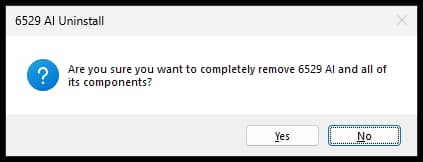
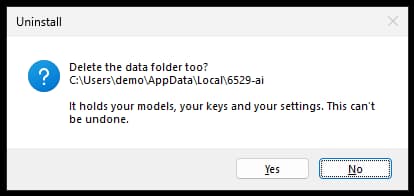
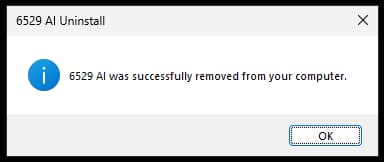
In Settings, Apps, choose 6529 AI and Uninstall. It asks to confirm, removes the programs, the scheduled task and the Start menu entry, then asks whether to delete the data folder. No keeps your models for a later install.
Linux
apt remove stops the service and removes the programs, and keeps the config, the data folder and the user:
sudo apt remove 6529-ai-cudaOutput: The following packages will be REMOVED:
6529-ai-cuda
0 upgraded, 0 newly installed, 1 to remove and 6 not upgraded.
After this operation, 1719 MB disk space will be freed.
Do you want to continue? [Y/n] Y
(Reading database ... 165219 files and directories currently installed.)
Removing 6529-ai-cuda (0.1.0~rc.2) ...apt purge deletes those too, with your models and keys; that can't be undone:
sudo apt purge 6529-ai-cudaOutput: The following packages will be REMOVED:
6529-ai-cuda*
0 upgraded, 0 newly installed, 1 to remove and 6 not upgraded.
After this operation, 0 B of additional disk space will be used.
Do you want to continue? [Y/n] Y
(Reading database ... 165176 files and directories currently installed.)
Purging configuration files for 6529-ai-cuda (0.1.0~rc.2) ...The package is 6529-ai for the CPU .deb. apt leaves ffmpeg and the other packages it installed with 6529 AI; sudo apt autoremove removes them.
Something not working? Known issues lists the bugs we know, with their fixes, and what hasn't been tested.
Found a problem?
Say which system you're on, what you did, and what happened, and add a screenshot and the log.
The pictures and output come from three computers, each with the config its install writes: the page, the models and the API on Ubuntu 24.04 with an NVIDIA L4 (24 GB) and 16 GB of memory; the Mac's chat on an Apple M2 with 24 GB; the Windows uninstall on Windows Server 2025 with no GPU.