

Install guide0.1.0-rc.2
Install 6529 AI
From the download to your first chat.
Untested test release. Expect problems, and don't rely on it for anything that matters. Known issues
What you need
- Apple silicon (M1 or later). Macs with Intel processors can't run it.
- macOS 13.3 or later.
- 0.2 GB for the app, and room for models: 0.6 GB to over 100 GB each.
Install
Open
6529-ai-0.1.0-rc.2-macos-arm64.dmg.A window shows 6529 AI and Applications.
Drag 6529 AI onto Applications, then eject the disk image.
Open 6529 AI from Applications.
macOS asks whether you're sure you want to open an app from the internet. Choose Open.
Choose Alone. Pick Beside a validator only if this Mac runs a 6529 validator.
macOS says 6529 AI added a background item. Your browser opens the 6529 AI page, signed in.
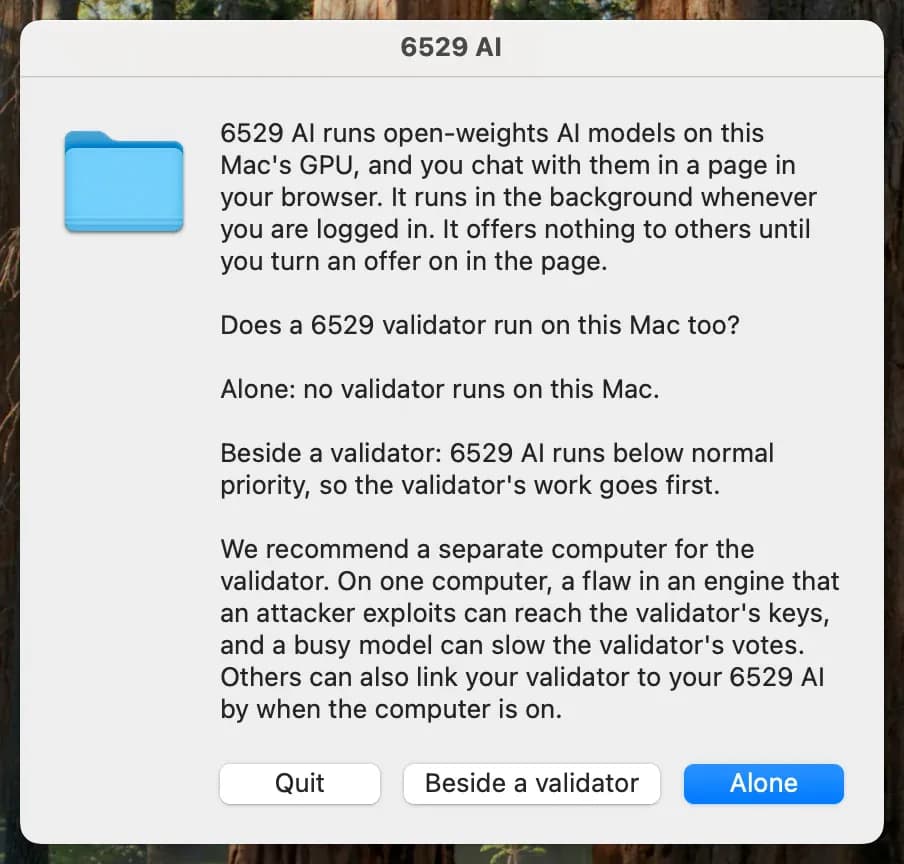
On first open, 6529 AI asks whether a 6529 validator runs on this Mac.
Open it again
Open 6529 AI from Applications. It runs while you're logged in.
Troubleshooting
If the page doesn't open within 60 seconds, the service didn't start. Its log says why:
~/Library/Logs/6529-ai.logUninstall
Run this in Terminal, then drag 6529 AI to the Trash. Add --data to delete your models too.
"/Applications/6529 AI.app/Contents/Resources/uninstall.sh"What you need
- Windows 10 version 1809 or later, or Windows 11, 64-bit. Windows on ARM can't run it.
- An Intel or AMD processor with AVX2: Intel since 2013, AMD since 2015.
- 0.4 GB for the app, and room for models: 0.6 GB to over 100 GB each.
- For the GPU, its maker's current driver. Without one, models run on the processor.
Install
Open
6529-ai-0.1.0-rc.2-windows-x64-setup.exe.Windows asks whether to let it make changes, and names the verified publisher 6529 Collection LLC. Choose Yes. If it names anyone else, don't run it.
Keep the folder it suggests.
C:\Program Files\6529 AIChoose No: 6529 AI alone on this computer. Pick Yes only if this computer runs a 6529 validator.
Keep its choice of where models run.
On the GPU, through Vulkan when your GPU's driver has Vulkan, otherwise On the CPU only.
Choose Install, then Finish with Open the 6529 AI page ticked.
It takes under a minute. Your browser opens the 6529 AI page, signed in.
Open it again
Choose 6529 AI in the Start menu. It runs whenever the computer is on.
Troubleshooting
If the page doesn't open within 60 seconds, the service didn't start. Its log says why:
%LOCALAPPDATA%\6529-ai\logs\6529-ai.logUninstall
Open Settings, Apps, choose 6529 AI and Uninstall. It asks whether to delete your models too.
What you need
- systemd and glibc 2.34 or later: Ubuntu 22.04, Debian 12, Fedora 35, RHEL 9 or newer.
- x86-64 with AVX2, or 64-bit ARM with ARMv8.2: AWS Graviton 2 or later, Ampere Altra, Raspberry Pi 5.
- For the CUDA package, NVIDIA's driver 575 or later.
- 0.3 GB for the app (1.7 GB with CUDA), and room for models.
Install
In the folder you saved it to, install the package for your computer.
uname -mprintsx86_64oraarch64.x86-64 · amd64.debsudo apt install ./6529-ai_0.1.0-rc.2_amd64.debx86-64, NVIDIA GPU · cuda_amd64.debsudo apt install ./6529-ai-cuda_0.1.0-rc.2_amd64.debARM64 · arm64.debsudo apt install ./6529-ai_0.1.0-rc.2_arm64.debapt asks whether a 6529 validator runs on this computer. Choose alone. Pick validator only if this computer runs one.
Wait for the sign-in link.
The install starts the service and prints a sign-in link, like this:
What it printshttp://127.0.0.1:<port>/login?token=…Open the link in a browser on this computer.
The 6529 AI page, signed in. The link works once, within 24 hours.
Open it again
For a new sign-in link:
sudo -u ai6529 6529-ai-cli --data /var/lib/6529-ai open --printAnother distribution
The .tar.gz installs the same files on any Linux with systemd. Download it from Downloads, then:
tar -xzf 6529-ai-0.1.0-rc.2-linux-x86_64-cpu.tar.gz
sudo ./6529-ai-0.1.0-rc.2-linux-x86_64-cpu/install.shtar -xzf 6529-ai-0.1.0-rc.2-linux-x86_64-cuda.tar.gz
sudo ./6529-ai-0.1.0-rc.2-linux-x86_64-cuda/install.shtar -xzf 6529-ai-0.1.0-rc.2-linux-arm64-cpu.tar.gz
sudo ./6529-ai-0.1.0-rc.2-linux-arm64-cpu/install.shTo uninstall, run sudo /opt/6529-ai/share/uninstall.sh, with --purge to delete your models.
Troubleshooting
If the page doesn't open within 60 seconds, the service didn't start. Its log says why:
journalctl -u 6529-aiUninstall
Remove keeps your models and settings; purge deletes them. Use 6529-ai-cuda for the CUDA package.
sudo apt remove 6529-aisudo apt purge 6529-aiYour first chat
On the 6529 AI page, press Get started.
The Start page shows how big a model this computer can run, and models that fit.
Press Fetch and serve on a model.
The row says Fetching while it downloads, then Serving when it's ready.
Press Open chat, pick the model, and send a message.
The model on this computer answers. Chats stay in this browser.
qwen3-4b-gguf2.5 GB, a good first chat model.Running a 6529 validator too?
Use a separate computer if you can. On one computer, an attacker who exploits a flaw in a model's engine can reach the validator's keys, and a busy model can slow its votes. If you run both, say so when the installer asks: 6529 AI then runs below normal priority.
Other programs
Programs on this computer can use your models through the OpenAI-compatible API at /v1, with an app key from Keys.
Found a problem?
Say which system you're on, what you did, and what happened, and add a screenshot and the log.